
The B-Roll Blueprint: Visual Pacing for Retention
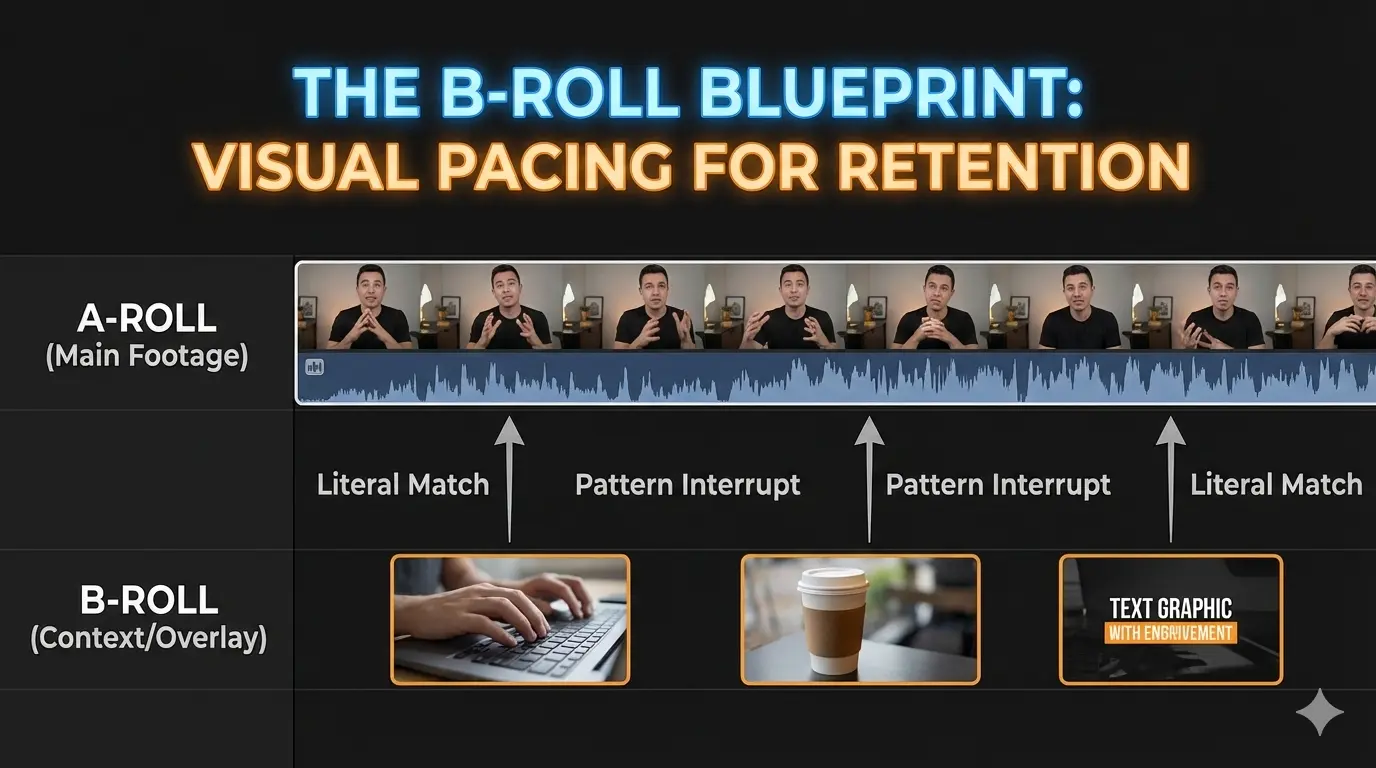
If your video is just a "talking head" for 10 minutes, your audience will leave. You need B-Roll not just to look "pro," but to reset the viewer's attention span every 5-7 seconds.
A-Roll
The primary footage—usually you talking to the camera. It provides the information.
B-Roll
Supplemental footage—overlays, stock clips, or close-ups. It provides the context.
The 3-Step B-Roll Rule
Don't just throw random clips over your audio. Follow this hierarchy to keep the story moving:
The Literal Match: If you say "iPhone," show an iPhone. (Good for beginners).
The Metaphorical Match: If you say "stressful," show a ticking clock or a coffee cup spilling. (Better for engagement).
The Pattern Interrupt: Every 30 seconds, change the type of B-roll (e.g., move from a stock clip to an on-screen text graphic).
"B-roll is the 'glue' that hides your cuts and keeps the brain from wandering. If they don't see something new, they start looking for the 'exit' button."
Where to Source High-Quality B-Roll
You don't need a $5,000 camera to get great visuals. Use these three tiers:
Tier 1 (Free): Pexels, Pixabay, or your own phone's 4K footage.
Tier 2 (Paid): Storyblocks or Epidemic Sound (for sound-synced B-roll).
Tier 3 (Custom): Macro close-ups of your workspace or screen-recordings of your process.