
How to Use AskLibra's Weekly Gameplan to Plan a Month of Content
Key Takeaways
- 1
AskLibra's weekly gameplan turns your channel's historical performance data into a concrete four-week publishing schedule, removing guesswork from content planning.
- 2
Stacking four weekly gameplans in sequence lets you build a full month of content around your highest-performing formats, topics, and posting windows.
- 3
Reviewing your gameplan output alongside your 90-day channel analysis reveals patterns — such as which video lengths retain viewers longest — that a single week of data would hide.
- 4
Creators who audit their monthly plan at the two-week mark and adjust remaining weeks based on early performance data consistently outperform those who set a schedule and ignore it.
Why Monthly Content Planning Feels Broken — and What Actually Fixes It
Most YouTube creators approach monthly planning the same way: they open a blank calendar, brainstorm titles, and try to fill 30 days with ideas that feel vaguely on-brand. The result is a schedule that looks organized but has no connection to what their specific audience actually watches, clicks, or finishes. Topics are chosen by gut feel. Posting days are chosen by convenience. And when a video underperforms, there is no data to explain why.
AskLibra's weekly gameplan solves this by replacing opinion with your own channel's evidence. Instead of guessing what might work, the gameplan reads your historical performance — your real click-through rates (CTR, the percentage of people who click your video after seeing the thumbnail), your audience retention curves (the graph showing what percentage of viewers are still watching at each second), and your engagement signals — and builds a publishing recommendation around what your specific audience has already rewarded. If you understand how to stack four of these weekly gameplans together, you get something most creators never have: a month of content grounded entirely in data.
What AskLibra's Weekly Gameplan Actually Contains
Before you can use the gameplan to plan a month, you need to understand what it produces. The weekly gameplan is not a content calendar template. It is a prioritized action list built from three layers of your channel data.
Layer 1 — Format recommendation. The gameplan identifies which video format drove the most engagement in your recent window. Format here means the structural type of content: long-form tutorials, short-form clips, list videos, reaction content, and so on. This matters because the same topic delivered in the wrong format can underperform significantly.
Layer 2 — Topic clusters. Based on your best-performing videos by watch time and retention, the gameplan surfaces topic areas your audience returns to. These are not random suggestions — they are derived from what your viewers have already voted for with their time.
Layer 3 — Timing windows. The gameplan uses your historical posting and performance data to identify when your audience is most likely to engage immediately after a video goes live. Early engagement velocity is one of the strongest signals the YouTube algorithm uses to decide how widely to distribute a new upload.
To understand the deeper mechanics driving these recommendations, read What is the YouTube Algorithm in 2026? A Data-Driven Breakdown and How AskLibra's 90-Day Analysis Works — And What It Finds in Your Channel.
Step 1 — Run Four Consecutive Weekly Gameplans and Treat Them as a Unit
The most common mistake creators make with the weekly gameplan is treating each output as standalone advice. They run it once, use it for one week, and then repeat the process without comparing outputs. This wastes the compounding value of sequential data.
Instead, run four weekly gameplans at the start of your planning month and lay the outputs side by side. Look for what stays consistent across all four: if the gameplan recommends a tutorial format three out of four weeks, that format signal is strong. If a topic cluster appears in two consecutive weeks, it is not a coincidence — your audience data is pointing you toward a content series opportunity.
This comparison step is where monthly planning becomes genuinely strategic. You are not just filling a calendar. You are identifying the through-lines your audience expects, and scheduling around them deliberately.
Step 2 — Assign Formats to Weeks Based on Frequency and Fatigue
Once you have your four gameplan outputs compared, assign a primary format to each week. The goal is to lead with your highest-engagement format but alternate supporting formats to prevent audience fatigue — the drop in engagement that happens when viewers feel a channel has become repetitive.
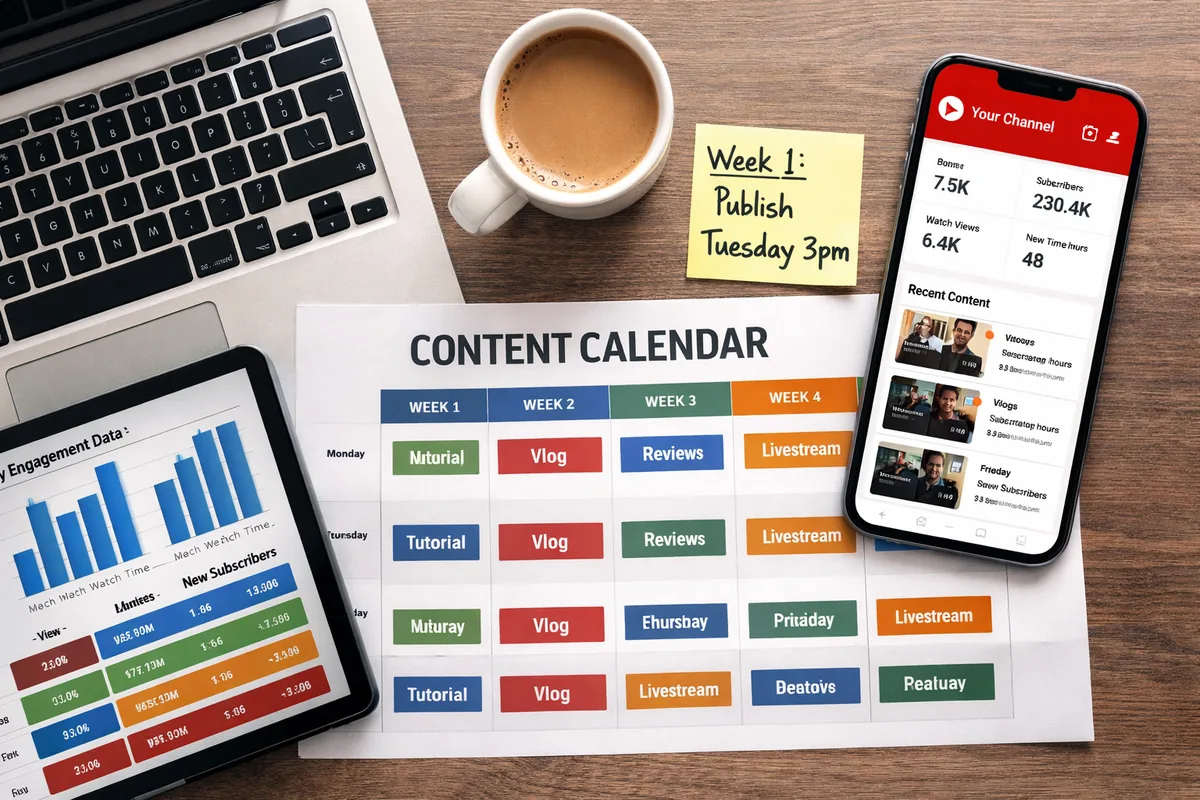
A practical four-week structure for most channels looks like this: Week 1 leads with your top-performing long-form format. Week 2 introduces a short-form or clip-style video on the same topic cluster to capture a different viewer entry point. Week 3 returns to long-form but shifts topic cluster. Week 4 uses a community-facing format — a Q&A, response video, or breakdown of a viewer question — which reinforces audience loyalty without requiring a new research cycle.
This rhythm gives you four publishing events that feel varied to the viewer but are structurally connected by the data your gameplan identified. For a deeper look at how format decisions affect retention, see YouTube Audience Retention: What the Numbers Actually Mean.
Step 3 — Map Topic Clusters to a Narrative Arc
A month of content performs better when each video can logically reference the one before it. This is not about creating a rigid series — it is about giving viewers a reason to watch more than one video in the same month.
Take the topic clusters your gameplans surfaced and arrange them in a teaching order. If your channel covers personal finance, and your gameplans surfaced budgeting, investing basics, and debt reduction as three distinct clusters, the arc writes itself: Week 1 on budgeting gives viewers the foundation. Week 2 on debt reduction applies that foundation to a common problem. Week 3 on investing basics shows what becomes possible once debt is managed. Week 4 ties the narrative closed with a viewer Q&A on all three topics.
Each video now has a natural internal link to the next, which increases the chance that a viewer who finishes one video clicks into the next — a behavior YouTube's algorithm reads as a strong satisfaction signal.
For help structuring the titles within this arc so each one earns the click, read How to Write a YouTube Video Title That Gets Clicked.
Step 4 — Schedule Uploads Around Your Data-Identified Posting Window
Your monthly plan is only as effective as its execution timing. AskLibra's gameplan surfaces your optimal posting window based on when your past videos generated their fastest early engagement. Publishing inside that window means your video enters the algorithm's evaluation period when your existing audience is most active — giving it the best possible start.
For a month-long plan, replicate that posting window for each of your four upload dates. Consistency in timing also trains viewer behavior: subscribers begin to anticipate your schedule, which increases the probability that they watch within the first hour of upload — a window that disproportionately affects how widely YouTube distributes the video. You can dig further into this in How to Find Your Best Posting Time on YouTube Using Your Own Data.
Step 5 — Build Your Hook Before You Script the Body
Every video in your monthly plan needs a hook — the opening 15 to 30 seconds designed to convince a viewer who just clicked that staying was the right decision. The hook rate (the percentage of viewers who watch past the first 30 seconds) is one of the earliest signals AskLibra uses to flag whether a video is underperforming its CTR potential.
For each of the four videos in your monthly plan, write the hook before you write anything else. Your hook should answer three questions in the first 30 seconds: What is this video about? Why does it matter right now? What will the viewer be able to do or understand by the end? This structure prevents the most common hook failure — videos that start with context before they start with value. For a full breakdown of hook construction, read What is a YouTube Hook and How Long Should It Be?
Step 6 — Schedule a Mid-Month Performance Audit
Planning a full month in advance does not mean committing to it blindly. At the two-week mark — after your Week 1 and Week 2 videos have published and gathered at least 72 hours of data — run a focused audit of both videos' performance against your gameplan predictions.
Specifically, check three metrics: CTR against your channel average (if CTR is below your average, the thumbnail or title needs revision before Week 3 publishes), audience retention at the 30% and 50% marks (if viewers are dropping before the halfway point, your script structure needs adjustment), and comment sentiment (a high comment volume with negative or confused sentiment suggests a topic-audience mismatch).
Use what you find to make targeted adjustments to your Week 3 and Week 4 videos before they publish. This mid-month correction loop is what separates creators who use data reactively from those who use it to prevent underperformance before it happens. See What 90 Days of YouTube Data Actually Reveals About Content Performance for the longer-term view of why this habit compounds over time.
How This Fits Into a Larger Content System
The monthly gameplan process described here is one component of a broader content operation. When your monthly schedule is connected to a channel-wide strategy — covering topic authority, SEO, thumbnail systems, and audience development — it becomes significantly more powerful. For the full picture, read How to Build a Complete Content System Using AskLibra.
It is also worth noting that content performance is increasingly evaluated not just by YouTube but by generative search tools that surface creator content in AI-driven answers. Understanding how that layer of discoverability works can help you plan content that earns reach across multiple platforms simultaneously. Start with What is Generative Search Optimization (GSO) and why should creators care?
A Note on Format Performance From AskLibra Data
Based on AskLibra data from 4 connected channels and 511 videos analyzed, image and carousel-style posts lead in engagement rate, with video content close behind at 0.4286 average engagement. This reinforces a planning principle that many video-only creators overlook: your monthly content plan should account for supporting content formats — thumbnails treated as standalone assets, community posts, and short clips — not just the primary video uploads. Each supporting piece extends the reach of your main video and gives the algorithm additional engagement signals to evaluate.
Frequently Asked Questions
How often should I run AskLibra's weekly gameplan?
Run the gameplan once at the start of each planning week, and then again at the two-week mark to catch any early performance signals that should influence your remaining schedule. Running it more frequently than that typically does not surface new information unless you have published multiple new videos in between.
Can I use the weekly gameplan if I only post twice a month?
Yes. The gameplan's format and topic recommendations apply regardless of posting frequency. If you post twice a month, use two consecutive weekly gameplan outputs and apply the same mid-month audit process at the one-week mark instead of the two-week mark.
What should I do if my four weekly gameplans recommend conflicting formats?
Conflicting format recommendations across four weeks usually signal a transitional period in your channel's performance data — meaning your audience's behavior has recently shifted. In this case, weight the two most recent gameplan outputs more heavily than the two older ones, since they reflect your current audience more accurately.
How does the weekly gameplan account for seasonal or trending topics?
The gameplan is built on your historical channel data, so it does not automatically surface external trends. You can manually layer trending topics onto the topic clusters the gameplan identifies — use a trending topic as the specific angle within a topic cluster your audience already follows. This keeps your content timely without abandoning the audience signals your data has validated.
What is the difference between a weekly gameplan and a 90-day analysis in AskLibra?
The 90-day analysis is a diagnostic tool — it surfaces what has worked and what has underperformed across a three-month window and identifies structural patterns in your channel's data. The weekly gameplan is an action tool — it translates those patterns into a specific, prioritized publishing recommendation for the next seven days. Use the 90-day analysis to set your strategy, and use the weekly gameplan to execute it week by week.
Ready to see what the data says about your channel?
Stop guessing. Use AskLibra to get a personalized 90-day growth gameplan and find your perfect posting window.
No credit card required • Join 2,000+ creators