
How to Improve Your YouTube Hook Rate
Key Takeaways
- 1
Hook rate is the percentage of viewers retained past the first 30 seconds — it directly signals quality to the algorithm.
- 2
The fastest fix is cutting your intro and opening with the payoff or conflict your thumbnail promised.
- 3
Pattern interrupts, visual proof, and direct questions are the three most reliable hook formats that hold attention.
Your Hook Rate Is a Retention Signal, Not Just a Metric
Hook rate — the percentage of viewers who continue watching past the first 30 seconds — is one of the most direct signals the YouTube algorithm uses to decide whether your video deserves wider distribution. A weak hook rate tells YouTube that your content is not matching viewer expectations, and it will suppress reach accordingly. If your channel is not growing despite solid thumbnails and consistent uploads, your hook rate is the first number to fix. Learn more about how this affects reach in Why Your YouTube Hook Rate Is Killing Your Reach.
What Counts as a Good Hook Rate?
A hook rate above 70% is strong. Between 50-70% is average and improvable. Below 50% means viewers are deciding within the first half-minute that your video did not deliver on its promise. For context, Mastering YouTube: What Will Be a Good Hook Rate in 2026? outlines how benchmark expectations are shifting as short-form viewer behavior bleeds into long-form habits. In short: 70% is the floor, not the ceiling.
The 4 Reasons Hook Rates Fail (And the Fix for Each)
1. Slow or Branded Intros
A logo animation, a "welcome back to my channel" monologue, or a recap of what you are about to cover all burn seconds that viewers will not give you. Fix: Cut everything before your first substantive sentence. Open mid-thought or mid-action. The viewer clicked because of a promise — deliver it immediately.
2. Thumbnail-Content Mismatch
If your thumbnail implies a shocking reveal, a tutorial answer, or a strong opinion, the first 30 seconds must address that implied promise. Any gap between what the thumbnail suggested and what the video opens with creates instant drop-off. Fix: Audit your last five videos. Write down the promise of each thumbnail in one sentence. Then watch your own opening 30 seconds and ask whether that promise is being addressed. This is directly connected to How to Improve Your YouTube Thumbnail Click-Through Rate — both metrics must work together.
3. No Stakes or Tension
Viewers stay when they feel something is unresolved. If your opening is descriptive rather than tensioned — "Today I am going to show you how to set up a home studio" — there is no reason to keep watching. Fix: Open with the problem, the failure, or the question. "I spent $2,000 on gear and my audio still sounded terrible — here is what actually fixed it." That sentence creates a gap the viewer wants closed.
4. Pacing That Feels Slow on Playback
Most creators watch their own footage at normal speed during editing. But viewers — especially those coming from Shorts or Reels — experience standard pacing as slow. Fix: Edit your hook at 1.25x speed in your preview. If it feels comfortable at that speed, it will feel tight at 1x. Remove every filler word, pause, and repeated phrase in the first 30 seconds.
3 Hook Formats That Consistently Work (With Examples)
The Direct Promise Hook
State the specific outcome the viewer will get and why it matters right now. Example: "In the next 8 minutes, you will know exactly why your YouTube retention is dropping after the three-minute mark — and the one edit that fixes it." This works because it is specific, time-bound, and addresses a real pain point.
The Pattern Interrupt Hook
Start with something visually or audibly unexpected — a fast cut to a surprising result, a counterintuitive statement, or an unusual location. Example: Cut straight to the finished product, then say "You are going to think this took expensive equipment. It did not. Here is everything I actually used." The viewer's assumption has been challenged before you have even introduced yourself.
The Question Hook
Ask a question the viewer is already asking themselves. Example: "Why does your channel get views but no subscribers?" If a viewer is experiencing that exact problem, this question functions as a mirror — they feel seen and they stay to hear the answer. For a deeper look at how this connects to broader retention strategy, see How to Boost Your YouTube Video Retention Rates: An In-Depth Guide.
Hook Rate Improvement Checklist
Remove all pre-hook content: No logos, no music intros, no "smash that subscribe" before the content starts.
State or show the payoff within 5 seconds: Lead with the result, the conflict, or the question — not the setup.
Match your thumbnail promise explicitly: Reference the exact tension or claim your thumbnail created.
Create an open loop: Give viewers a reason to stay — a reveal, a result, or an answer that is coming.
Edit for pace at 1.25x: If pauses feel comfortable at accelerated speed, they will feel tight at normal speed.
Test one hook variable per upload: Change only the opening 15 seconds between comparable videos to isolate what is working.
Review retention curves in YouTube Studio: Find the exact second where drop-off spikes and cut or restructure that moment.
How to Read Your Retention Data to Find the Hook Problem
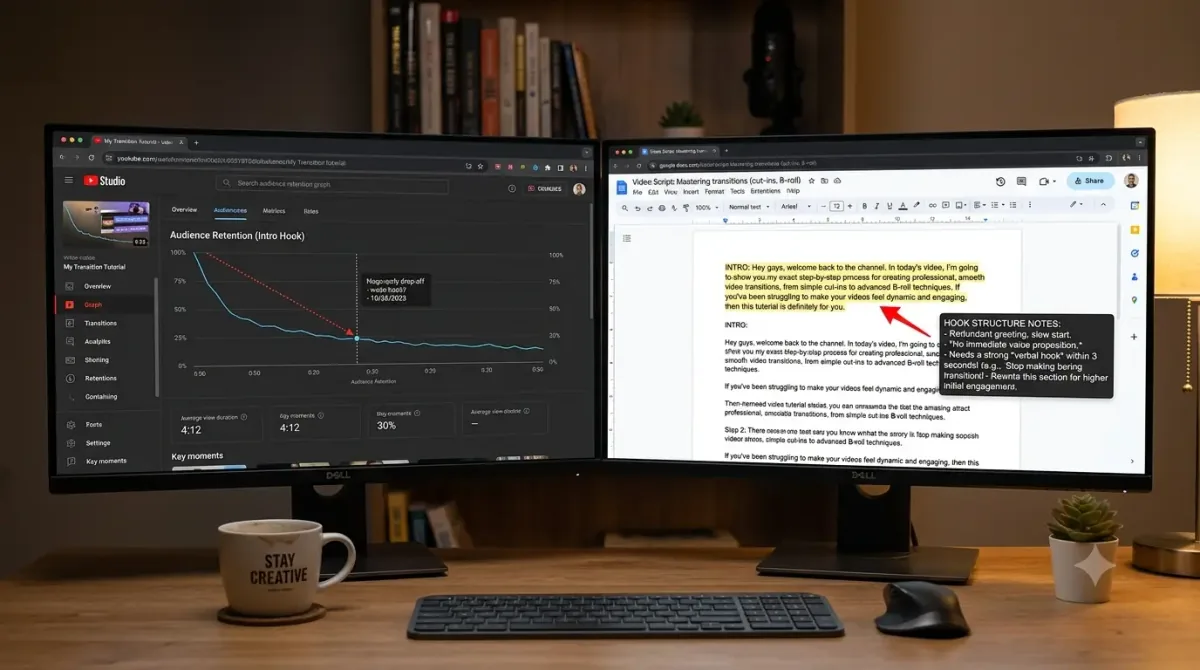
Open YouTube Studio and navigate to the Audience Retention report for any video. Look at the first 30 seconds of the retention curve. A healthy hook shows a gradual, shallow decline. A poor hook shows a steep drop in the first 10-15 seconds — that is the moment your viewer decided the video was not what they expected. If the drop is at seconds 3-5, the problem is pacing or mismatch. If it is at seconds 15-20, the problem is that your open loop was not strong enough to sustain curiosity. For more on interpreting this data without getting overwhelmed, see Read YouTube Analytics Without Overwhelm.
Using Your Analytics to Prioritize Which Videos to Fix First
Not every video with a weak hook is worth re-editing. Prioritize videos that have strong click-through rates but low average view duration — those are the clearest signal that your thumbnail is working but your hook is failing. If both CTR and retention are low, the problem is broader than the hook. If retention is strong after the 30-second mark but drops early, the hook is your lever. Understanding Hook Rates: Boost Your GSO Game in 2026 breaks down how hook data connects to search and answer-engine visibility beyond just YouTube's algorithm.
What to Do Next
Pull your five most recent videos in YouTube Studio and check the retention curve for each one at the 30-second mark. Rank them by hook rate. Take the worst performer and rewrite the opening 15 seconds using one of the three hook formats above. Re-upload or update the video if your workflow allows, or apply the fix to your next upload. Track the difference over two weeks. If you want a systematic way to turn your analytics into a repeatable content strategy, How to Create a Content Strategy Using Only Your YouTube Analytics Data is the logical next step.
Frequently Asked Questions
What is hook rate on YouTube?
Hook rate is the percentage of viewers who continue watching your video past the first 30 seconds. It is measured inside YouTube Studio's audience retention report and is one of the clearest early signals of whether your content is matching viewer expectations.
What is a good YouTube hook rate?
A hook rate above 70% is considered strong. Between 50-70% is average with room to improve. Below 50% typically means there is a significant mismatch between what your thumbnail or title promised and what your video opens with.
How do I fix a bad hook rate without re-uploading?
You cannot edit a published YouTube video's content directly. The most practical fix is to apply improved hook techniques to your next uploads and use the data from poor performers to understand exactly where viewers are dropping off — then avoid that pattern going forward.
Does hook rate affect YouTube SEO or recommendations?
Yes. YouTube's algorithm treats early retention as a quality signal. A low hook rate reduces the likelihood that your video gets recommended to non-subscribers or surfaces in suggested video placements. Improving hook rate directly improves distribution potential.
How often should I test different hook styles?
Test one hook variable per upload on comparable videos — same topic category, similar thumbnail style. This isolates what is working. After six to eight videos, you should have enough data to identify which hook format performs best for your specific audience.
Ready to see what the data says about your channel?
Stop guessing. Use AskLibra to get a personalized 90-day growth gameplan and find your perfect posting window.